
AI-Powered Features
Asset Loadout uses cutting-edge AI vision models to analyze your assets and automate tedious organization tasks.
Multi-Provider AI Support
Choose the AI provider that works best for your workflow. All providers support vision analysis for both audio (via spectrograms) and images.
Anthropic Claude
RecommendedExcellent at analyzing audio spectrograms and understanding sound characteristics. Great attention to detail for metadata generation.
OpenAI GPT
Excellent for image and texture analysis. Strong at understanding visual content and style classification.
Google Gemini
Cost-effective multimodal AI with strong performance. Good balance between quality and price.
Cost tip: Use "Fast" models for batch operations and quick analysis. Use "Balanced" for daily work (recommended default). Use "Powerful" for the highest quality metadata generation.
Audio Analysis via Spectrograms
Asset Loadout generates visual spectrograms of your audio files and sends them to AI vision models for analysis. This allows AI to "see" the frequency content and temporal characteristics of sounds.
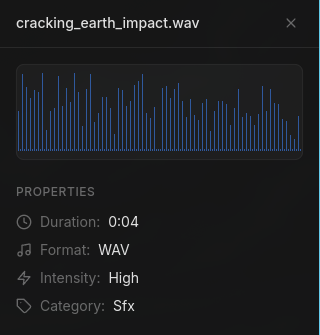
AI-Generated Metadata
Descriptive Filename
snake_case suggestions based on sound content
Example: "heavy_metal_door_creak"
Folder Path
Optimal categorization suggestion
Example: "SFX/Impacts/Metal"
Natural Description
Detailed explanation of the sound
Example: "A creaking metal door with low-frequency grinding"
Game Use Cases
Suggested scenarios for use
Example: "Horror atmosphere, dungeon entrance, old building"
Mood & Emotion
Emotional qualities of the sound
Example: "Tense, ominous, unsettling"
Intensity Level
Volume/energy classification
Example: "Medium" (low/medium/high)
Category
Type classification
Example: SFX, Music, Ambient, Voice, UI, Foley
Similar To
References to well-known sounds
Example: "Silent Hill ambient sounds"
Image & Texture Analysis
AI vision models directly analyze your images to understand content, detect texture types, and suggest optimal organization.
AI-Detected Properties
Content Description
Natural language description of what the image contains (e.g., "Weathered brick wall texture with moss growth")
Texture Type Detection
Automatically identifies base color, normal map, roughness, specular, AO, height, emissive, and metallic maps
Seamless/Tileable Detection
Detects if textures are seamlessly tileable for use in 3D environments
Style Classification
Identifies art style: photorealistic, stylized, pixel-art, hand-painted, low-poly, etc.
Searchable Tags
Generates descriptive tags for easy searching (e.g., "stone", "medieval", "outdoor", "rough surface")
AI Reorganization Agent
The most powerful AI feature: a multi-step agent that can scan an entire directory, analyze all files, and reorganize everything intelligently. Available in both Library view and Browse tab.
From Library View
Select files or folders in your Library, right-click → "Reorganize with AI". Uses your library's existing folder structure as context.
From Browse Tab
Navigate to any folder on your system, right-click → "Reorganize with AI". Opens a configuration modal to customize the process.
Configuration Options (Browse Tab)
When initiating reorganization from the Browse tab, a configuration modal lets you customize the process:
Root Folder Name
Set a root folder name (e.g., "Assets") or leave empty to organize files in place.
Asset Types
Choose which asset types to include: Images (PNG, JPG, WebP, TIFF) and/or Audio (WAV, MP3, OGG, FLAC).
Include Subdirectories
Toggle recursive scanning to include all files in subdirectories or only the selected folder.
Output Preview
See a preview of the expected folder structure before running (e.g., Assets/Images/Textures/..., Assets/SFX/Impacts/...).
How the Agent Works
- 1.Scan: Recursively finds all audio/image files based on your configuration
- 2.Analyze: AI analyzes each file via spectrograms (audio) or direct vision (images)
- 3.Decide: Only moves files that need reorganization - well-named files in appropriate folders are left alone
- 4.Execute: Creates folders, renames files to snake_case, and moves them to logical categories
- 5.Report: Shows a summary of all actions taken with a complete log
Example Output Structure
Before:
sound_final_03.wav, audio_v2.mp3, texture1.png...
After:
Assets/
SFX/
Impacts/metal_hit_heavy.wav
Footsteps/gravel_step_01.wav
Ambient/forest_birds_loop.mp3
Images/
Textures/brick_wall_diffuse.png
Smart behavior: The agent uses snake_case naming, handles duplicates with _01, _02 suffixes, and preserves file extensions. It won't move files that are already well-organized.
AI Usage & Cost Control
You have full control over when and how AI is used. Analysis is cached in the database, so you never pay to analyze the same file twice.
On-Demand Only
AI only runs when you explicitly trigger it. No automatic background analysis.
Cached Results
AI-generated metadata is saved to your local database. Re-importing files won't re-analyze them.
Batch Operations
Analyze multiple files at once during import to minimize API overhead.
Your API Key
You pay directly to AI providers - no markup. Monitor your usage through their dashboards.
Typical costs: With Fast models, analyzing 100 audio files costs approximately $0.50-$1.00. Balanced models cost ~$2-4 for the same batch. Powerful models cost ~$5-10 but provide the highest quality metadata.
Next: Recommended Workflows
Learn efficient workflows for organizing assets, batch processing, and exporting to your game projects.
Explore Workflows →